Key takeaways
- Toast is our #1 for most one-location restaurants: kitchen display, handhelds, payroll and online ordering from one vendor.
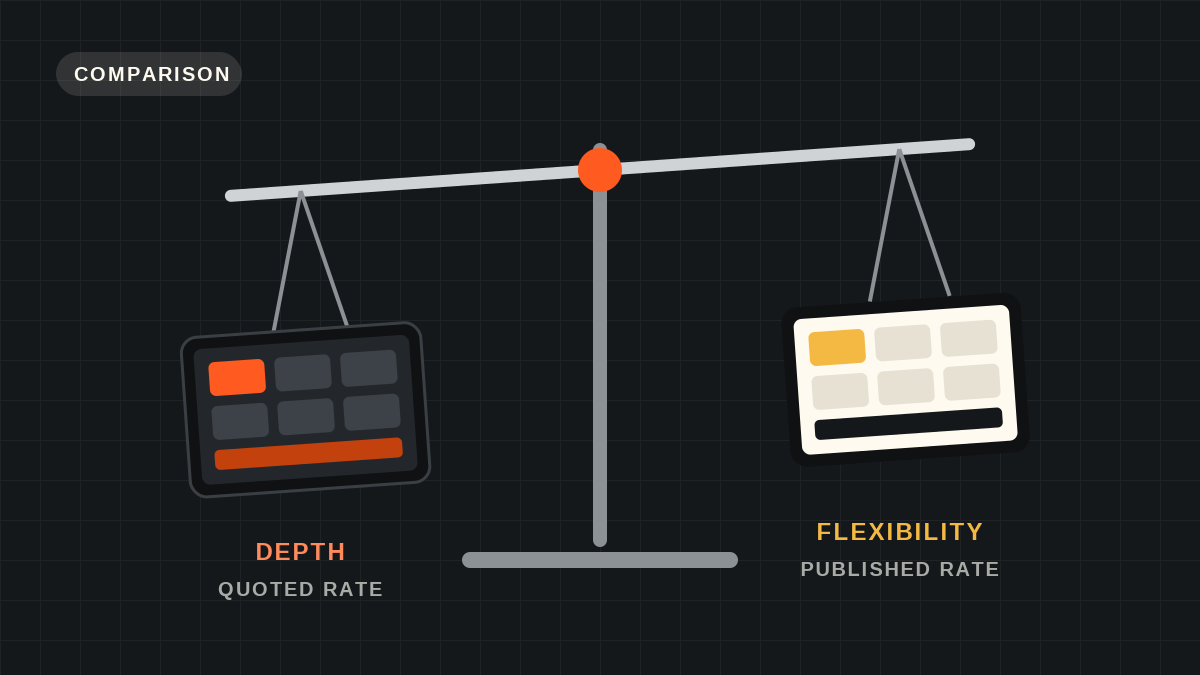
- SpotOn is the pick if you want printed rates and a month-to-month plan. Square is the pick if you won't sign a contract.
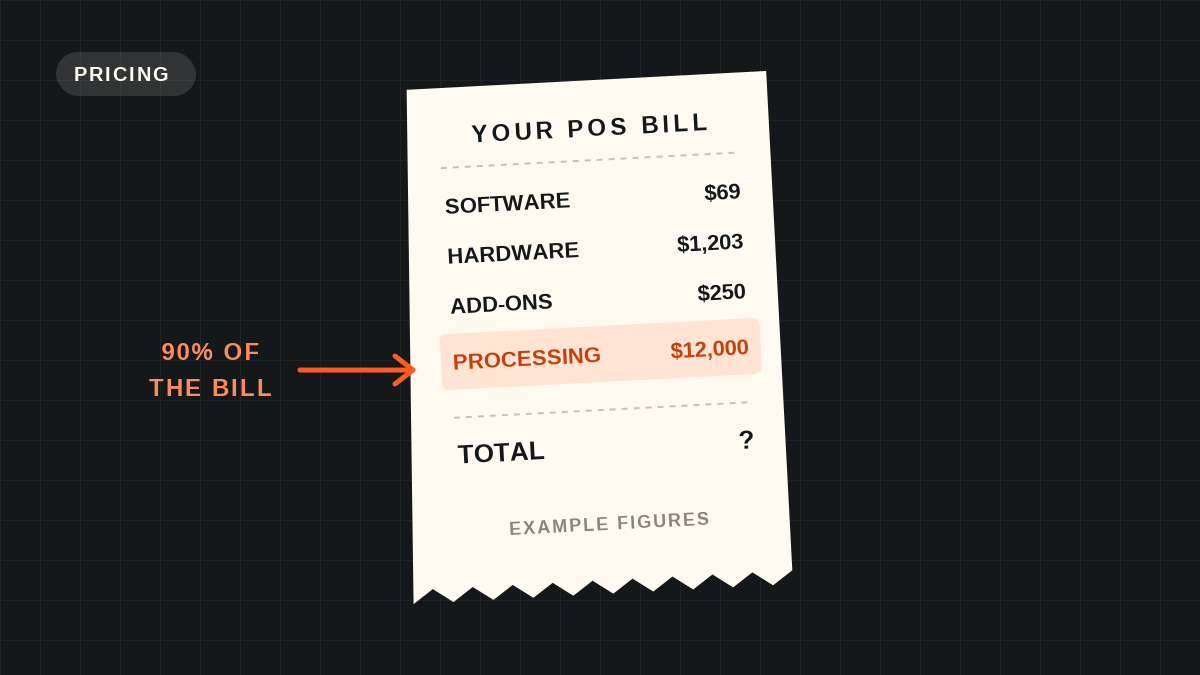
- Processing is about 90% of the bill. On $40,000 a month in card sales, the paid plans land within about $400 a year of each other.
- $0 plans cost more once you are busy. The Toast Starter Kit is about $2,100 a year more than the $69 plan at that volume.
Our top 5 picks
- Our #1 pick
Toast
Best overall for small restaurants
- $0 Starter Kit plan to get started
- Kitchen display and Toast Go handhelds are part of the standard system
- Payroll, online ordering and reservations from one vendor
Watch: 24 or 36 month contract; above about $10,000 to $20,000 a month in card sales, the $69 plan costs less than the Starter Kit
SpotOn
Best for published pricing
- Rates printed on its pricing page
- Essentials plan is month to month
- 24/7 support for POS, payments and hardware
Watch: The $0 All-In plan has a 2-year minimum
Square for Restaurants
Best if you won't sign a contract
- No long-term contract
- Free plan, paid for in a higher processing rate
- Runs on iPads or Square hardware you own
Watch: Kitchen display needs a paid plan, $20 to $30 a device each month; support is mostly online
Clover
Best when a seller you trust offers good terms
- Software from $14.95 a month per device
- Clover Flex handheld
- Month to month when bought direct
Watch: Bank resellers can sign you to 36 months
Lightspeed Restaurant
Best for iPad-first cafés with a bigger menu
- Runs on iPads
- Native online ordering
- Strong multi-location tools on top plans
Watch: From $69 a month and usually an annual contract
Not sure which? Take the 6-question quiz.
The five picks side by side
| POS | Monthly software | Card rate (in person) | Contract | Hardware | Best for |
|---|---|---|---|---|---|
| Toast | $0 Starter Kit, $69 Point of Sale | About 3.09% to 3.69% + $0.15 on $0; about 2.49% + $0.15 on $69 | 24 or 36 months, auto-renews | Toast-only Android; countertop kit about $1,203, $0 on the Starter Kit for the first device | Full service and growing restaurants |
| SpotOn | $0 All-In, $55 a station Essentials | 2.79% + $0.20 All-In; 2.45% + $0.15 Essentials | All-In 2 years; Essentials month to month | SpotOn stations: Station 15 $995, included on All-In | Printed pricing and an exit option |
| Square | $0 Free, $49 Plus, $149 Premium | 2.6%, 2.5% or 2.4% + $0.15 | None | Your iPad, or Terminal $299, Register $899 | Owners who will not sign a contract |
| Clover | From $14.95 a device; restaurant plans cost more | Reported 2.3% to 2.6% + $0.10; sellers set their own | Direct: none reported; banks and resellers up to 36 months | Clover devices, about $500 to $900 for a Mini or Flex | A seller you trust with good terms |
| Lightspeed | $69, $189 or $399 | About 2.6% + $0.10, confirm in your quote | Usually annual | Runs on iPads | iPad-first cafes with a bigger menu |
Want it re-ranked for your own must-haves? Use the POS comparison grid.
How we ranked them
We scored each system on what a small restaurant pays for every day:
- Restaurant tools in the box. Kitchen display, handhelds, online ordering and payroll without stitching together apps.
- Real cost on your card volume. Processing is about 90% of what a POS costs, so a low monthly fee can still be the expensive choice.
- Contract and hardware. How long you are locked in, and whether the hardware is worth anything if you leave.
- Support. Whether someone answers the phone on a Friday night.
Every fact on this page comes from the vendor's own 2026 pricing and product pages and from our sourced guides. Vendors can't pay to change a ranking.
Compare POS quotes, free
How many POS stations do you need?
About a minute. No cost, no obligation.Why Toast is our #1 for small restaurants
Toast is built only for restaurants, and the parts a small restaurant needs come from Toast itself: the kitchen display and Toast Go handhelds are part of the standard system, and payroll, online ordering and reservations (Toast Tables) are Toast products rather than third-party apps. The $0 Starter Kit gets a new restaurant running with no monthly software fee, paid for through a higher processing rate of about 3.09% to 3.69% + $0.15.
The trade-offs are the contract, usually 24 or 36 months, and the rate, which Toast quotes per restaurant instead of publishing. Once you pass roughly $10,000 to $20,000 a month in card sales, the $69 Point of Sale plan at about 2.49% + $0.15 costs less than the Starter Kit. Our Toast pricing guide has the full break-even table.
The five picks, one at a time
1. Toast: best all-round POS system for a small restaurant
What it is. A restaurant-only POS that sells the software, the Android hardware and the card processing together.
Cost. $0 a month on the Starter Kit at about 3.09% to 3.69% + $0.15, or $69 a month on Point of Sale at about 2.49% + $0.15. A countertop kit is about $1,203 if you buy it; the $0 plan covers the first device only. Toast quotes its rate, so get it in writing.
Who it fits. Full-service rooms, busy kitchen lines, servers on handhelds, and anyone who may open a second location.
Watch out. A 24 or 36 month contract, a rate that can change with 30 days' notice, and hardware that runs nothing else. Read Toast pricing, Toast fees and Toast hardware cost, or the full Toast review.
2. SpotOn: best for printed pricing
What it is. A restaurant POS that publishes its rates and sells a plan with no contract.
Cost. All-In is $0 a station at 2.79% + $0.20 with hardware included. Essentials is $55 a station at 2.45% + $0.15, with hardware bought up front. Its optional Core Bundle is $50 a month plus 0.20% of card volume, capped at $200.
Who it fits. Owners who want to see the price before a rep calls, and who want to be able to leave.
Watch out. All-In has a 2-year minimum, and early exit can bring hardware and implementation charges. Kiosks use a third party. See Toast vs SpotOn.
3. Square: best if you will not sign a contract
What it is. A POS that runs on iPads and Square devices, with published rates and no long-term contract.
Cost. Free, $49 Plus or $149 Premium per location, at 2.6%, 2.5% or 2.4% + $0.15 in person. A Terminal is $299, a Register $899 and a stand $149 for your own iPad.
Who it fits. Small spots, cafes and counter service that want to start cheap and stay flexible.
Watch out. Kitchen display costs $20 to $30 a device each month, coursing needs Premium, and phone support runs weekdays below Premium. Offline card payments decline if the device stays offline more than 24 hours. See Toast vs Square.
4. Clover: best when the seller offers good terms
What it is. A platform owned by Fiserv, usually bought through a bank or payments reseller.
Cost. Software starts at $14.95 a month per device, and sources report restaurant plans from about $60 to $90 a month direct. Rates of about 2.3% to 2.6% + $0.10 are reported, but sellers set their own.
Who it fits. One counter-service spot that watches every dollar and has a rate and contract in writing.
Watch out. Bank deals often run 36 months with auto-renewal, and Clover devices are tied to Fiserv processing. There is no native payroll. See Toast vs Clover.
5. Lightspeed: best for iPad-first cafes with a bigger menu
What it is. An iPad-based restaurant POS that suits venues with more than one revenue center.
Cost. $69, $189 or $399 a month by plan. Lightspeed Payments is about 2.6% + $0.10, but the rate is not published, so confirm it in your quote.
Who it fits. Cafes, bars and hotel venues that already use iPads and have a long menu with many modifiers.
Watch out. Contracts are usually annual, and Lightspeed charges $399 a month if you keep a non-integrated processor. See the multi-unit POS comparison and our coffee shop picks.
When to pick something else
- You want the rates in writing before you talk to anyone: SpotOn prints its rates, from 2.45% + $0.15, and its Essentials plan is month to month. See Toast vs SpotOn.
- You won't sign a contract at all: Square has no long-term contract and runs on iPads you own. See Toast vs Square.
- A seller you trust offers Clover on good terms: Clover software starts at $14.95 a month per device, but bank resellers can sign you to 36 months, so read the agreement.
What a small restaurant POS really costs
A POS system for a small restaurant has four costs: software, hardware, add-ons and card processing. Processing is the big one, about 90% of the bill. So a $0 plan is not free. It is paid for in a higher rate.
Take a restaurant with $40,000 a month in card sales at a $32 average check. That is $480,000 a year and 15,000 card transactions. One terminal, no kitchen screens, no online orders, hardware not counted.
| Plan | Processing | Software | Yearly total |
|---|---|---|---|
| Toast Starter Kit ($0, 3.09% + $0.15) | $17,082 | $0 | about $17,100 |
| Toast Point of Sale ($69, 2.49% + $0.15) | $14,202 | $828 | about $15,000 |
| SpotOn All-In ($0, 2.79% + $0.20) | $16,392 | $0 | about $16,400 |
| SpotOn Essentials ($55, 2.45% + $0.15) | $14,010 | $660 | about $14,700 |
| Square Free (2.6% + $0.15) | $14,730 | $0 | about $14,700 |
| Square Plus ($49, 2.5% + $0.15) | $14,250 | $588 | about $14,800 |
| Clover direct (2.3% + $0.10, $89.95 a month) | $12,540 | $1,079 | about $13,600 |
| Lightspeed ($69, about 2.6% + $0.10) | $13,980 | $828 | about $14,800 |
Three things stand out:
- The paid plans land close together. Toast, SpotOn Essentials, Square and Lightspeed sit within about $400 of each other. At this size, the contract and the tools should decide it, not the price.
- The $0 plans cost more. The Toast Starter Kit is about $2,100 a year more than Point of Sale, and SpotOn All-In is about $1,700 more than Essentials. A higher rate beats a lower software fee once you pass a few thousand dollars a month.
- Clover looks cheapest only at a direct rate. A reseller at 2.6% + $0.10 with a $135 monthly bundle comes to about $15,600, on par with Toast.
Now add the extras. Hardware runs about $1,200 for a Toast countertop kit, $299 for a Square Terminal or $995 for a SpotOn Station 15. Kitchen screens, online ordering, payroll and reservations each add a monthly fee. On Square Plus, three kitchen screens add about $1,080 a year. A quote 0.2 points lower than the rate above saves about $1,000 a year at this volume. For every part of the bill, see how much a restaurant POS costs. Run your own volume through the processing fee calculator, and see what Toast charges for the full fee list.
How to choose a POS system for a small restaurant
Use this checklist before you sit through a demo:
- Pick your service style first. Counter service can run on a light system. Full service needs coursing, seat numbers and handhelds.
- Price it on your own card sales. Use last year's card volume and transaction count, not the vendor's example.
- Ask for the rate in writing. Include the keyed, online and Amex rates, and whether the rate can change during the term.
- Get the exit cost in dollars. Ask what you owe if you leave in month 12, including software fees and any hardware balance.
- Check the hardware. Will it run on iPads you own, and is it worth anything if you leave?
- List the extras you will really use. Kitchen display, online ordering, payroll, reservations, loyalty. Get one all-in monthly figure.
- Test offline mode. Ask the rep to unplug the internet in the demo and watch the kitchen screen and cards.
- Check support hours. Find out who answers the phone on a Friday night, and on which plan.
Still unsure? Get matched with a system that fits your restaurant, or take the 6-question quiz.
Compare them on your own numbers
Put your yearly card sales into the processing fee calculator to see a year of fees on each plan, or tick your must-haves in the POS comparison grid to re-rank these systems for your restaurant.
Ready to compare real prices?
How many POS stations do you need?
About a minute. No cost, no obligation.Common questions
What is the best POS for a small restaurant?
Toast is our top pick for most small restaurants because the kitchen display, handhelds, online ordering and payroll all come from one restaurant-only vendor, and the $0 Starter Kit keeps the start-up cost low. Square is the better choice if you will not sign a contract.
Is there a free POS for restaurants?
Toast, SpotOn and Square all have a $0 software plan. Each one charges a higher processing rate instead, so the free plan costs more than a paid plan once your card sales grow.
How much does a restaurant POS cost a month?
Software runs from $0 to about $69 a month for one location on most of these systems, plus hardware and add-ons. Processing is the bigger number: roughly 2.4% to 3.7% of card sales plus about $0.10 to $0.20 a transaction. On $40,000 a month in card sales, the yearly total lands between about $13,600 and $17,100.
What is the best POS system for a small restaurant with no contract?
Square. It has no long-term contract on any plan and runs on iPads you own. SpotOn Essentials is also month to month, and Clover bought direct is reported to have no long-term processing contract.
What is the best POS for a small quick service restaurant?
For counter service, Square and Toast are both strong. Square is cheaper to start and needs no contract. Toast adds kiosks, a kitchen display and handhelds as standard. See our guide to the best POS for quick service restaurants.
Can I use my own iPad?
With Square and Lightspeed, yes. Toast, SpotOn and Clover run only on their own hardware.
Is Toast worth it for a small restaurant?
Usually yes for full service or a restaurant that may grow, because the kitchen display, handhelds, payroll and online ordering come from one vendor with 24/7 chat and daily phone support until midnight Eastern. It is worth less if you want no contract or need to start on a very small budget. See the Toast review.
How long does it take to switch POS systems?
Plan the cutover for a slow week and keep your old system running until the new one is tested. Our POS migration checklist walks through it.
Prices and features from vendor pages and the sources in our linked guides, checked October 2026. Confirm anything that decides your choice in writing.
Disclosure: we are referral partners for Toast and SpotOn. If you request a quote through a link on this page and become a customer, we may receive a fee at no cost to you. Partner fees do not change what we recommend. How we make money.